Free for life · Works offline · No account

Your network.
Your pride.

Merlions is a pocket memory for the people you meet. Speak, scan or type, and it remembers who they are, what you talked about and what you promised, then nudges you to follow up. Everything stays on your phone.

For founders, freelancers, consultants and sales people.

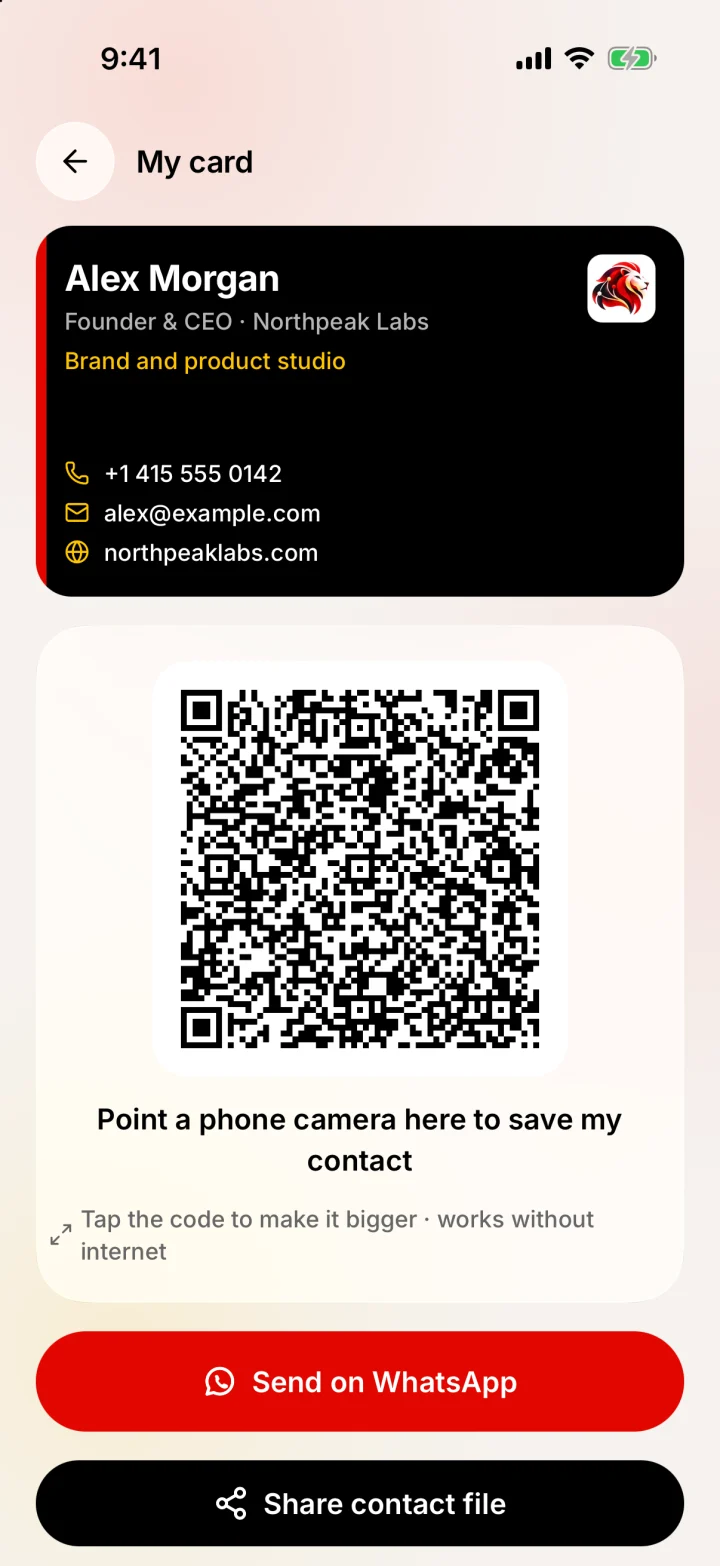
Merlions My card: a black business card and a QR code to share it
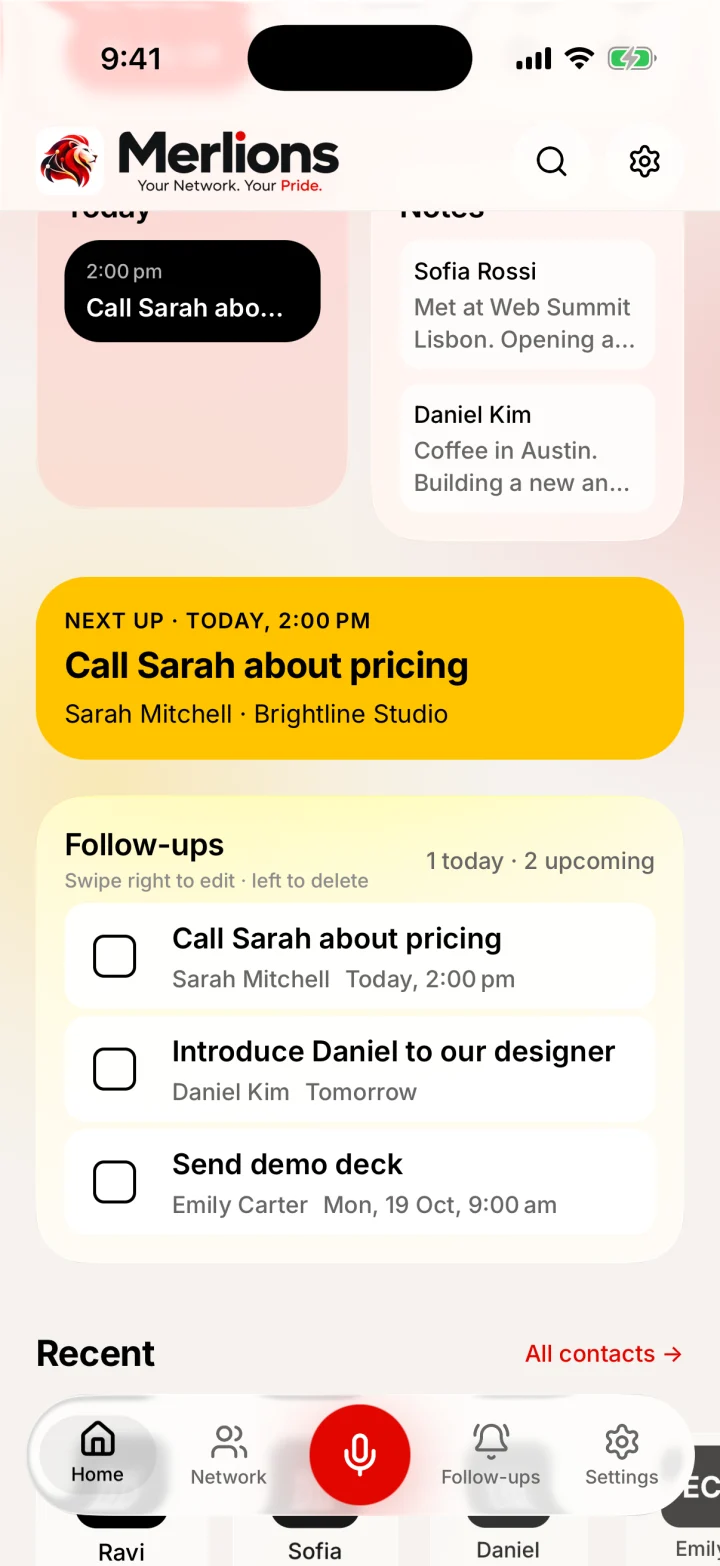
Merlions Home: Today schedule, Notes, yellow Next up card and Follow-ups
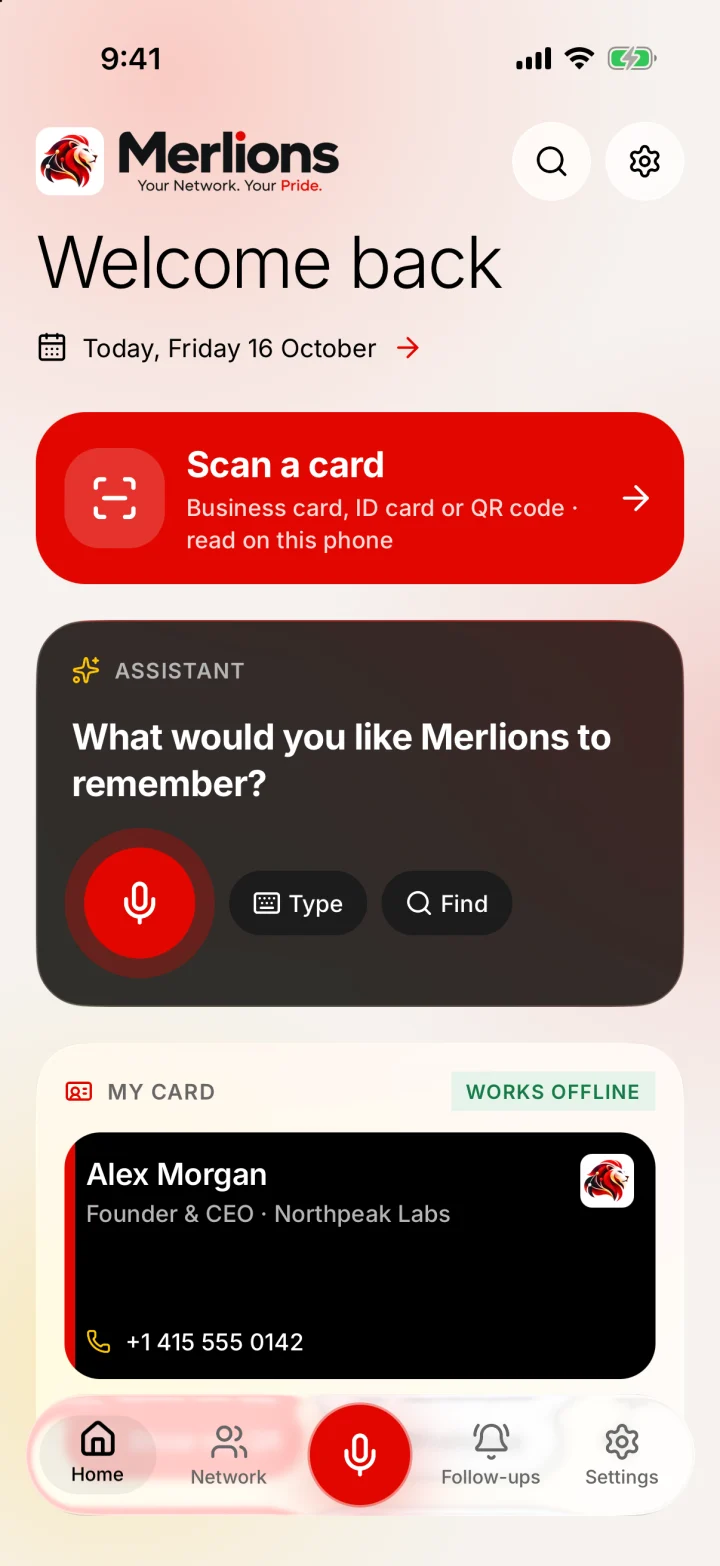
Merlions Home: a red Scan a card button, the assistant with a mic, and My card
“Remind me to call Sarah on Friday at 2”

Next up · Today, 2:00 PM

Call Sarah about pricing

Sarah Mitchell · Brightline Studio

Scroll
Free for lifeNo contact limitsWorks offlineNo account, no Merlions serverNo ads or trackersNo paid AIGoogle optionalEvery voice action has a typed oneNothing saved without your OKFree for lifeNo contact limitsWorks offlineNo account, no Merlions serverNo ads or trackersNo paid AIGoogle optionalEvery voice action has a typed oneNothing saved without your OK
What it does

Speak. Remember. Find. Follow up.

It isn’t a CRM. There are no pipelines, team seats or sign-ups, just the four things you actually need after you shake someone’s hand.

Speak

Tap the mic and say it the way you’d tell a friend. Merlions turns it into a contact, a note or a reminder, and shows you exactly what it will save before it does.

Listening

You said

“

Nothing is saved yet

Prefer typing? Every voice action has a typed one.

Remember

Snap both sides of a visiting card. The text is read on your phone, you check every field, and the photos are thrown away.

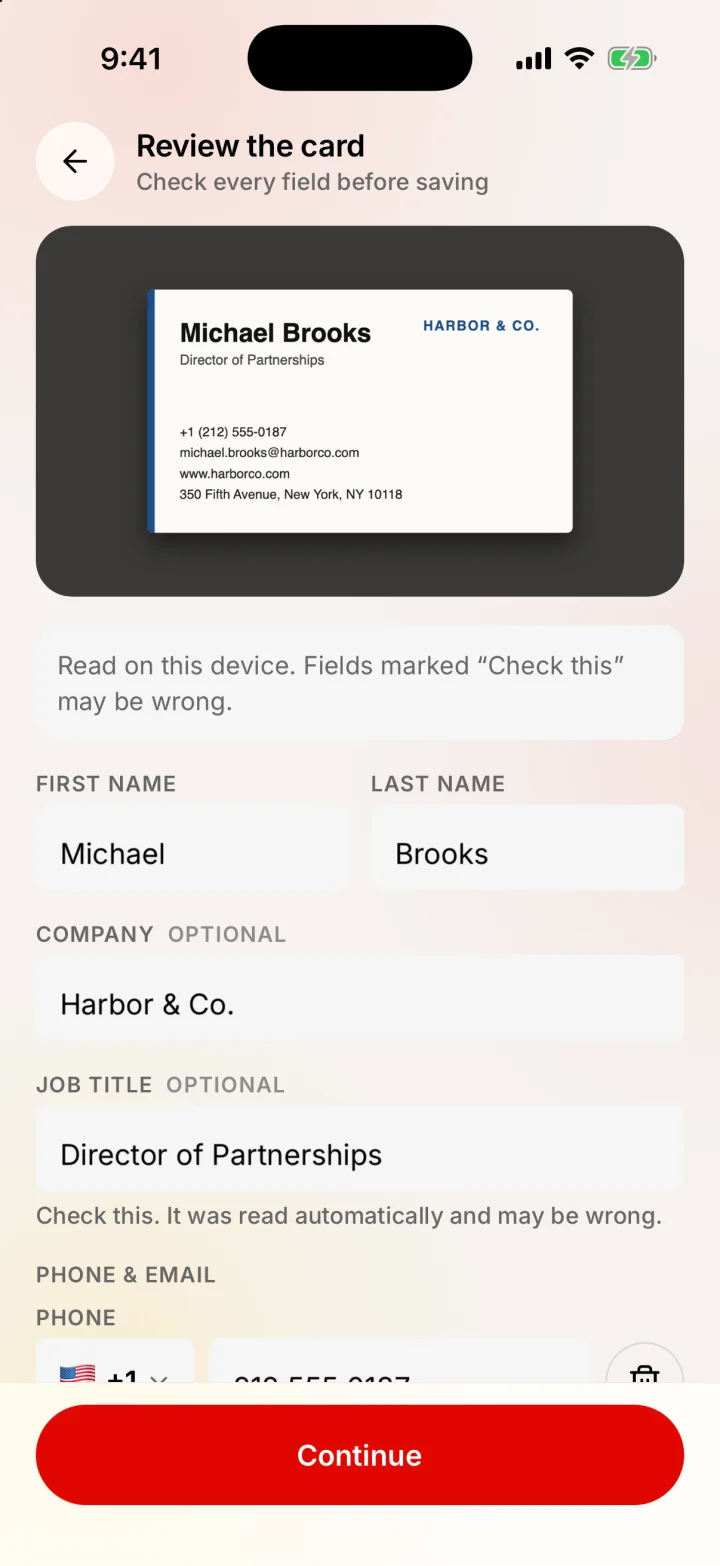
Merlions scanned-card review: every field editable before saving

Find

Search by what you remember, not just a name. Merlions shows the note that matched, so you know why a person came up.

Follow up

Promises turn into reminders on your phone, and you don’t need a calendar account. Swipe right when it’s done, left to reschedule.

  • Tap to try it.
How it works

From a handshake to a follow-up.

01 · Capture

A card, a QR or your voice.

Scan a visiting card or someone’s Merlions QR, or just say who you met. Every field lands on a review screen, and nothing is saved until you press Continue.

Merlions scanned-card review: every field editable before saving

02 · Remember

Your whole network, searchable.

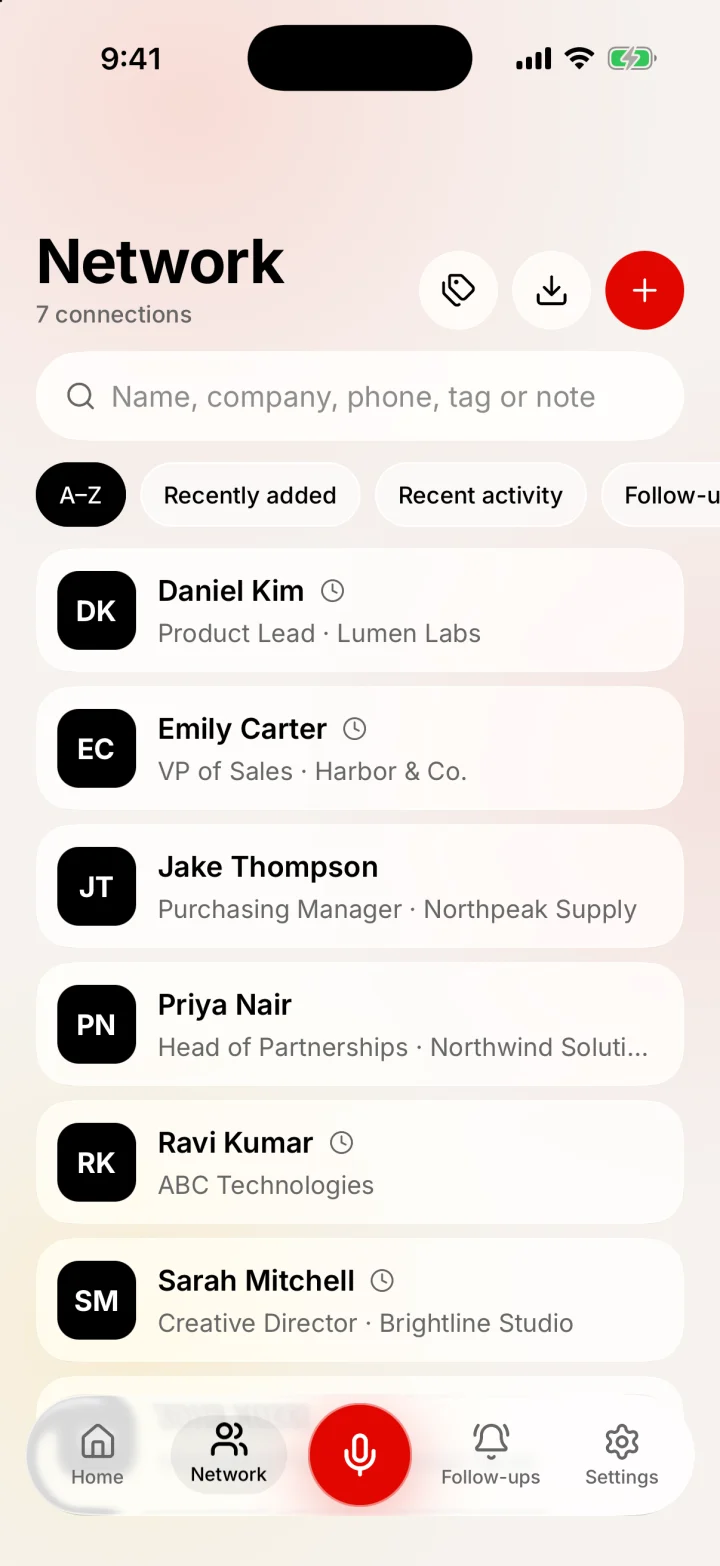
Sort A–Z, by recently added, recent activity or what’s due. Search by name, company, phone, tag or anything in your notes.

Merlions Network: searchable list of contacts with sort chips

03 · Follow up

Today, at a glance.

Home shows today’s schedule, your latest notes, the one thing that’s next up, and a checklist of follow-ups you can swipe through.

Merlions Home: Today schedule, Notes, yellow Next up card and Follow-ups

04 · Share

Hand over your card without the paper.

Your own business card lives in the app. Show the QR and any phone camera can save your contact, even without internet.

Merlions My card: a black business card and a QR code to share it
New · Event mode

Built for the expo floor.

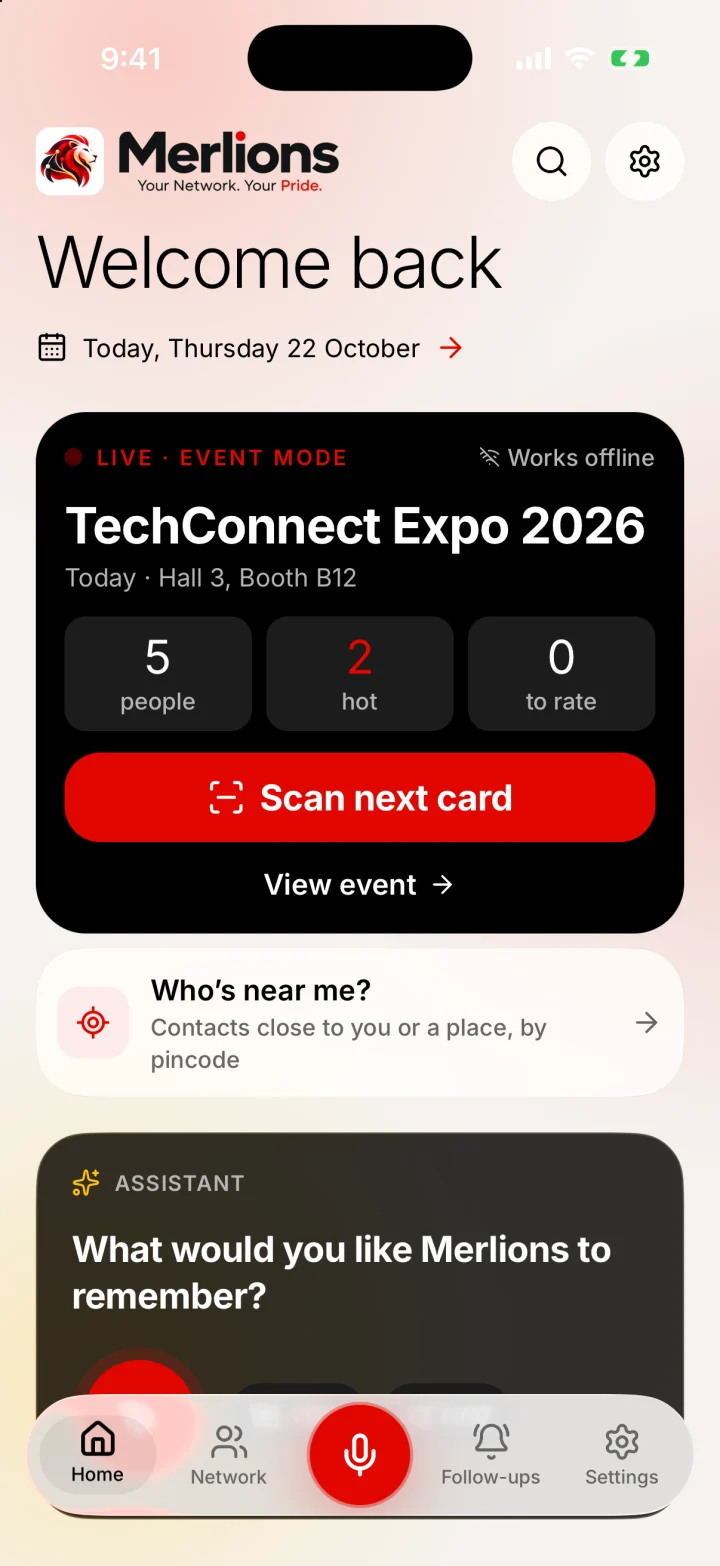
Fifty cards in a day, and by Monday you can’t remember who was who. Event mode turns Merlions into a lead scanner that remembers the event, the moment and how interested each person was.

Go live

Name the event once. Every card you scan joins it, with its date, venue and default tags.

Scan, rate, say it

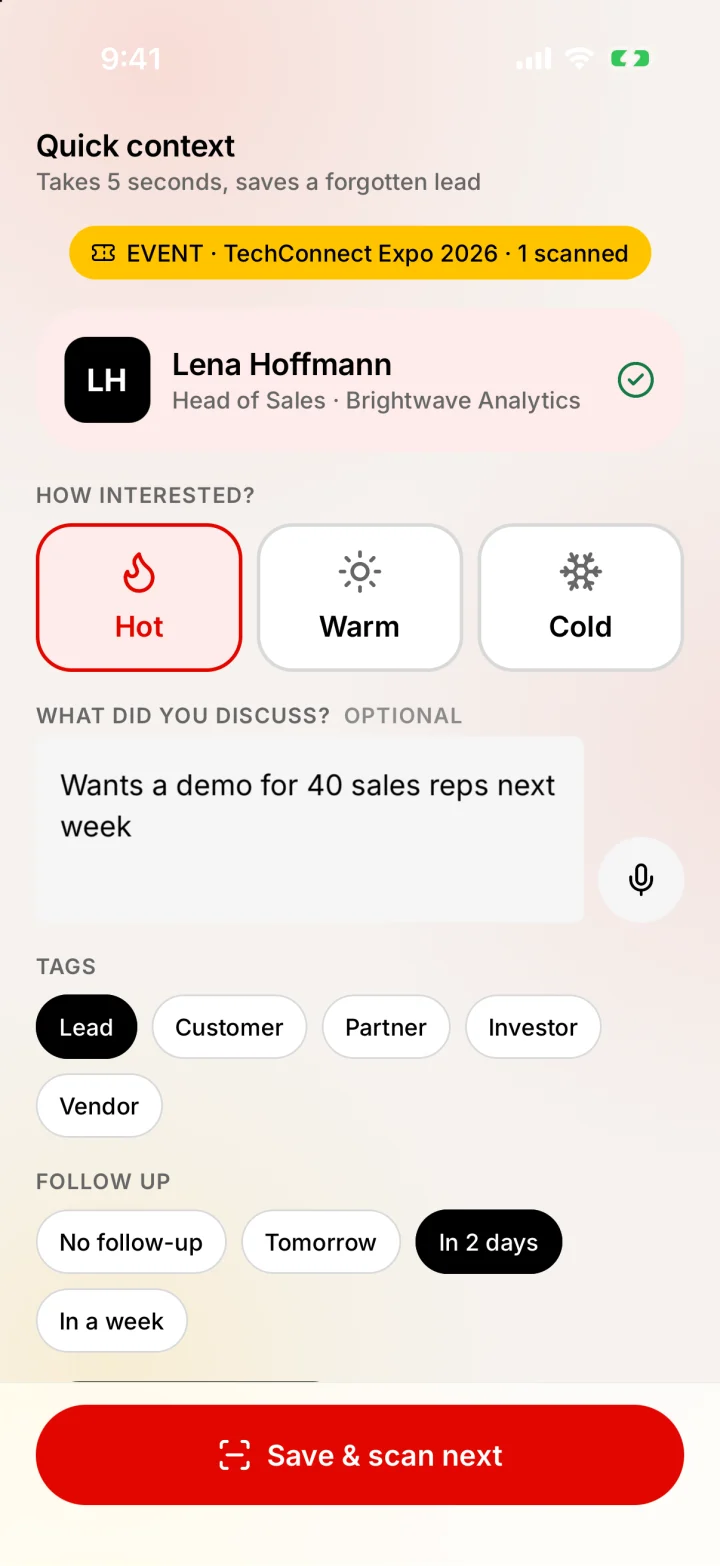
Tap Hot, Warm or Cold and add a line on what you discussed, typed or spoken. Then Save & scan next.

See who’s hot

One screen shows everyone you met, filtered by interest, with follow-ups set and a CSV export.

No venue Wi-Fi needed Hot Warm Cold
How Event mode captures expo leads
Merlions Quick context after a scan: Hot, Warm or Cold, what was discussed, tags and follow-up
Merlions Home in Event mode: a live event card with people, hot leads and a Scan next card button
New · My card

Your card, always in your pocket.

Make your own business card once. Share it as a QR code, a contact file or a message. The other person doesn’t need Merlions to save it.

  • QR that works offline
  • Scan theirs back
  • Share by message
  • Edit any time
More about the free digital business card
Merlions My card: a black business card and a QR code to share it
Privacy, by construction

It’s your network. It stays on your phone.

No account

No sign-up and no Merlions server. Your network is not our database.

Works offline

Contacts, notes, search and reminders all work with no connection.

Encrypted on the phone

Your data is encrypted with AES-256, and the key stays in your phone’s Keychain.

No ads, no trackers

No analytics SDKs, no ad networks, no paid AI. Nothing to sell.

Private reminders

Notification previews show no names or notes unless you turn them on.

You confirm every save

Anything heard or scanned is shown back to you before it’s stored.

Google is optional, one feature at a time

Turn on Google Drive backup if you want a copy off the phone, by hand or daily or weekly. It goes to a hidden app folder, and each upload is downloaded again and checked before it counts.

The Merlions Vault: an encrypted copy you control

Keep an AES-256 encrypted copy in a folder you choose, on the phone or, on iPhone, in iCloud Drive, so deleting and reinstalling the app doesn’t lose your contacts. A recovery passphrase you set protects it.

Straight talk: backup files and Google Drive backups aren’t encrypted yet (the Vault is). That’s on the roadmap. Voice uses your phone’s speech recognition, which may run on Apple’s servers unless on-device recognition is available; the app tells you which. The microphone only listens while the recording screen is open after you tap the mic.

The little things

Thoughtful, all the way down.

Both sides of a card

Name from the front, extra numbers and address from the back, with duplicates removed.

Duplicate check

Already know them? Add to the existing contact instead of making a twin.

WhatsApp in a tap

Message a contact straight from their page, with the country code sorted.

Tags & filters

Group people your way: event, city, deal stage, anything.

Built for big networks

Lists and search are indexed and benchmarked up to 50,000 contacts.

App Lock

Face ID, Touch ID or passcode, re-locking when you leave the app.

Who’s near me?

Contacts close to you or to a pincode or place you type, 2 to 50 km. Location is read once and never kept.

Find by voice

Say a name or a detail to search your contacts. Typing works the same way.

Swipe to finish or reschedule

Swipe a follow-up right when it’s done, left to move it to later today, tomorrow or a date you pick.

At a glance

Merlions in one minute.

Merlions is a free, offline app for remembering the people you meet for work. No account, no ads, and your data stays on your phone.

Price
Free for life, no contact limits, no in-app subscription
Platforms
iPhone and Android
Account
None needed. There is no Merlions server
Where data lives
On your phone, in an AES-256 encrypted database
Internet
Not needed for contacts, notes, search or reminders
Ways to add people
Voice, typing, business card scan, or someone’s QR card
Expos and events
Event mode tags every card you scan with the event, a hot/warm/cold rating and what you discussed, offline
Location
Only when you open Nearby: approximate, read once, never stored or sent
Reminders
Local phone notifications, no calendar account required
AI
No paid AI or chatbot. Commands are parsed on the phone
Ads and tracking
None. No analytics, ad or tracking SDKs
Backups
A backup file, optional Google Drive backup, or the encrypted Merlions Vault in a folder you choose
Google
Optional. Google Drive backup if you turn it on
Made by
Testware Informatics
FAQ

Fair questions.

Merlions is a free mobile app that remembers the people you meet for work: who they are, what you talked about and what you promised them. You add people by voice, typing or scanning their business card, and Merlions reminds you to follow up. Everything stays on your phone.

Yes. The core app is free for life with no contact limits. There’s no subscription tier hiding the useful parts, and no paid AI behind it to pay for. Merlions is a complimentary productivity app from Testware Informatics.

No. Open the app and start. Google is only involved if you choose to connect it for a specific feature, like Drive backup.

On your phone, in an AES-256 encrypted database. Nothing goes to a Merlions server, because there isn’t one. You can save a backup file, turn on Google Drive backup, keep an encrypted copy in the Merlions Vault, or delete everything from Settings.

Yes. Adding contacts, notes, search, follow-ups and reminders all work with no internet connection. Your QR business card also works offline.

Yes. It reads the front and back of a visiting card on the phone, lets you check and edit every field, warns you about duplicates, and deletes the photos when you save. You can also delete them straight away, or rescan.

Create your card once under My card, then show its QR code or share it as a contact file or message. Any phone camera can save your contact from the QR, even without internet, and the other person doesn’t need Merlions.

Yes. Turn on Event mode before you walk the floor. Every card you scan is tagged with the event; you tap Hot, Warm or Cold and add a line about what you discussed. At the end of the day one screen shows who you met and who's hot, with follow-ups already set and a CSV export for your team. It all works offline, so weak venue Wi-Fi doesn't matter. More on expo lead capture.

Yes. The free booth standee maker turns your My card QR, or any contact QR, into a print-ready table-top standee. Visitors scan it with their phone camera to save your contact. It runs in your browser and nothing is uploaded.

Yes. Nearby shows contacts close to where you are, or to a place or pincode you type, using the pincode in their address. Merlions reads your approximate position once when you ask, works out distances on the phone, and never stores or sends your location.

Three ways, all optional: save a backup file, turn on Google Drive backup (to a hidden app folder, by hand or daily or weekly), or turn on the Merlions Vault, which keeps an AES-256 encrypted copy in a folder you choose so reinstalling the app doesn't lose anything. Backup files and Drive backups aren't encrypted yet; the Vault is.

Yes. Merlions Event mode scans visitors' business cards or contact QR codes on your phone, rates each lead hot, warm or cold, saves what you discussed and exports a CSV, with no account, no per-lead fee and no venue Wi-Fi needed. See expo lead capture.

Merlions is made by Testware Informatics (Testware Informatics Private Limited, Chennai, India) and offered free as a complimentary productivity app. The website is merlions.app; the privacy policy and terms are published there.

Sometimes, which is why Merlions never saves what it heard without showing you first. You can edit the transcript, and anything you can say, you can also type. Speech uses your phone’s speech recognition, which may run on Apple or Google servers unless on-device recognition is available; the app tells you which.

Not in the chatbot sense. There is no paid AI service and nothing is sent to an AI model. Spoken or typed commands are turned into actions by a rule-based parser on the phone, and you confirm every change.

No. There are no pipelines, deal stages or team features. Merlions is a personal memory for the people you meet and what you owe them, closer to a smart address book than to sales software.

Both. Merlions is on the App Store for iPhone and on Google Play for Android.

Your network is cleared for takeoff.

Merlions is on the App Store and Google Play. Free, offline, and yours.

0%
Packing your contacts